Heh, an employee at my work got an email saying his anti-malware was failing to update, and to run http://10.3.4.2/xbejdjr.exe and that they need to click allow when the browser warns them that it is rejected, then right click, run as administrator, and they need to click allow in two other places to let it run.
So he reported as phishing, then IT contacted his manager saying he was failing to help IT run a required update, it was evidently totally legit, but just the most scammy looking way they imagined.
They can send executable links through emails and get their pants in a twist when the users do the right thing and report it for being shady AF, but they can’t use RMM to automatically install their updates? Bullshit IT department needs to be fully replaced.
10.0.0.0/8 is a reserved lan name space, so I’d probably have ran it after confirming the headers (anything 10.x.x.x will be on your local network) but I do agree, shady and stupid af especially since IT presumably should be running their own dns and it’s trivial to implement a redirect to an internal corporate tld.
I would have assumed a beach head where they compromised a system on the internal network and then phished to extend the reach.
I figured IT of all people would have allocated some DNS and some certificate. I would have taken the lack of TLS and DNS as a consequence of an attacker not having enough access to make those things a reality, and banking on people viewing 10. as safely internal like you are inclined to suggest.
Just because it has an internal address does not mean it is safe, particularly as number of employees goes up and any one of them can get a system under their control compromised.
I never said it was safe, I said it was internal. If it’s on 10.x.x.x, sent with email headers verified against my orgs Auth, it’s beyond my or any normal user’s pay grade to deal with it and should’ve been caught far far before this point by design. Though, what you’re saying does align with defense in depth principals, I think you’ll find they cannot be expected in real life use, but perhaps you’re the type to independently verify every file you interact with via hash. Idk, some people on lemmy go hard. 🤷♂️
That is so fucking sketchy, I’d have to talk to the IT guy myself or get on a video call to make sure their email or the group chat or whatever wasn’t compromised.
is it tho? that’s a LAN IP, so just a file on the company’s network. browsers whine about http by default bc its security over WAN. then windows just whines about everything
well of course. just meant the IT guy didnt necessarily do anything sketchy or wrong, just a consequence of all those modern security prompts. totally get why folk would be apprehensive seeing that, deal with it all the time. but i’ve also never seen a company where they have an SSL cert for the LAN or something either, it just gets explained
I think teaching nontechnical employees that its okay to enter an IP address they don’t know, given to them by a remote person and bypassing security prompts would qualify as “wrong”.
by explain, i didn’t mean teach everyone it’s always okay to ignore security prompts. maybe that’s just how the cookie crumbled as the fix but it should’ve been explained why it’s being done that time, that’s where I think they’re wrong, I rescind that. you’re right that especially remotely it’ll create bad habits.
IME IT just walked our asses over when it’s something like that, never worked in a giant office, so that’s where I spoke from, ya feel me
If you told users those are internal and to use them they will quickly forget to verify the link as they were told previously to click on them anyways.
If that was legitimately IT, then that whole department either need the funds to acquire some remote management software, or they all need to be axed. Only the budget will tell.
It’s the latter. They actually get thrown all sorts of money in part because they say they need tools. The standard corporate load has at least 3 patch management software suites, two ‘cybersecurity monitoring solutions’, three anti-malware software products.
Sometimes their automation fails and this was one of those situations where his and at least in our department only his where their automation failed for some reason or another. So they fall back to a sketchy looking exe on some random web server they don’t even bother to enable https on (they also provision root CAs, so it’s not like it would be a challenge for them to have https on an internal domain).
They aren’t very good, but they are doing things perfectly right; so long as the one deciding what is right is the sales reps of the software they use.
I tried to make the case to IT that hyperlinks are not a threat vector on their own. They should train against opening attachments and entering credentials once the link is clicked. I haven’t heard back yet, I’m not sure they liked my message. But they did send a message letting us all know that reporting non-phishing surveys wastes their time.
Unfortunately, theres very good statistics that show 1-click attacks are quite common beyond just phishing for login creds. Granted, not nearly as common as the latter, it’s still a moat you had to dig :(
The argument regarding hyperlinks is generally that there are 1-2 click zero-day vulnerabilities pretty frequently, so clicking a hyperlink will take you to a server controlled by the attacker which may or may not employ one of those. Additionally there’s a constantly rotating array of obscure HTML/CSS hacks to trick even the savviest of users into thinking an attacker controlled window is something else or otherwise compromise a users system without utilizing zero-days. And finally good ol’ social engineering typically relies on several vectors at once, so by the time someone’s clicked the link there’s a good chance they might go further for the attacker before they clue in.
So yeah, theoretically if everything was as it should be, clicking the hyperlink and downloading and executing literal malware wouldn’t work, but security is about trying to make sure the weak points of every part of the chain don’t line up, because when those holes in all of the layers of security line up, you’ve got a nice big compromise to clean up, and those buggers are like bedbugs, once they get in, you can be chasing them for months or years until you’re finally rid of them
The web is very locked down already. People click so many links from email, but also outside of email. Clicking a hyperlink in an email is not a threat vector. If it was, we can’t vote on when to meet, open shared documents, or basically do anything other than plaintext email. Aha! That’s the solution. Plaintext email - all attachments and HTML are blocked.


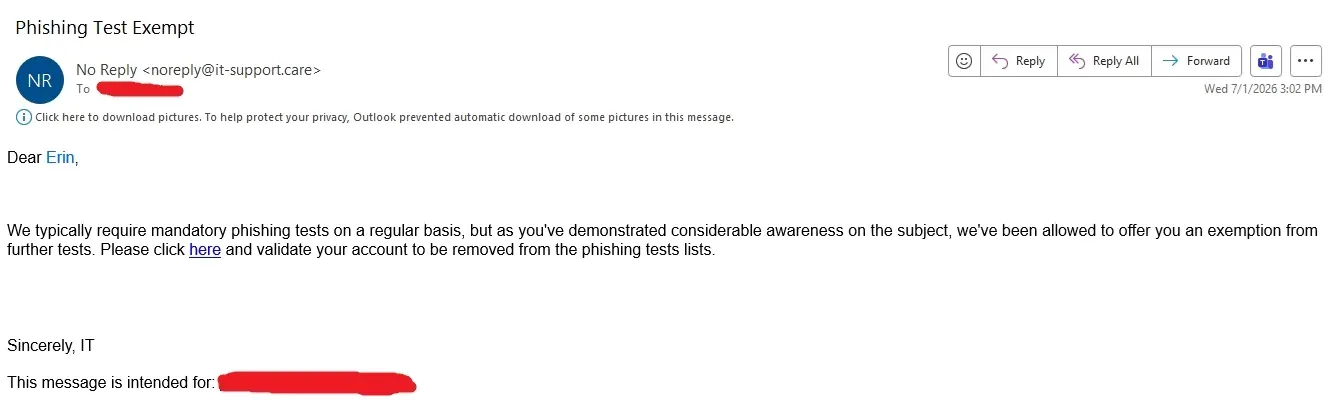
My company: Don’t click on suspicious links.
Also my company: It’s employee survey time, click this link to complete the survey http://surveywhale.com/haidn39fk49cmc93mx
I mark them as phishing attempts every damn time.
Heh, an employee at my work got an email saying his anti-malware was failing to update, and to run http://10.3.4.2/xbejdjr.exe and that they need to click allow when the browser warns them that it is rejected, then right click, run as administrator, and they need to click allow in two other places to let it run.
So he reported as phishing, then IT contacted his manager saying he was failing to help IT run a required update, it was evidently totally legit, but just the most scammy looking way they imagined.
They can send executable links through emails and get their pants in a twist when the users do the right thing and report it for being shady AF, but they can’t use RMM to automatically install their updates? Bullshit IT department needs to be fully replaced.
10.0.0.0/8 is a reserved lan name space, so I’d probably have ran it after confirming the headers (anything 10.x.x.x will be on your local network) but I do agree, shady and stupid af especially since IT presumably should be running their own dns and it’s trivial to implement a redirect to an internal corporate tld.
I would have assumed a beach head where they compromised a system on the internal network and then phished to extend the reach.
I figured IT of all people would have allocated some DNS and some certificate. I would have taken the lack of TLS and DNS as a consequence of an attacker not having enough access to make those things a reality, and banking on people viewing 10. as safely internal like you are inclined to suggest.
Just because it has an internal address does not mean it is safe, particularly as number of employees goes up and any one of them can get a system under their control compromised.
I never said it was safe, I said it was internal. If it’s on 10.x.x.x, sent with email headers verified against my orgs Auth, it’s beyond my or any normal user’s pay grade to deal with it and should’ve been caught far far before this point by design. Though, what you’re saying does align with defense in depth principals, I think you’ll find they cannot be expected in real life use, but perhaps you’re the type to independently verify every file you interact with via hash. Idk, some people on lemmy go hard. 🤷♂️
That is so fucking sketchy, I’d have to talk to the IT guy myself or get on a video call to make sure their email or the group chat or whatever wasn’t compromised.
is it tho? that’s a LAN IP, so just a file on the company’s network. browsers whine about http by default bc its security over WAN. then windows just whines about everything
Yes. An average employee doesn’t know the difference between public and private IP’s
well of course. just meant the IT guy didnt necessarily do anything sketchy or wrong, just a consequence of all those modern security prompts. totally get why folk would be apprehensive seeing that, deal with it all the time. but i’ve also never seen a company where they have an SSL cert for the LAN or something either, it just gets explained
I think teaching nontechnical employees that its okay to enter an IP address they don’t know, given to them by a remote person and bypassing security prompts would qualify as “wrong”.
by explain, i didn’t mean teach everyone it’s always okay to ignore security prompts. maybe that’s just how the cookie crumbled as the fix but it should’ve been explained why it’s being done that time, that’s where I think they’re wrong, I rescind that. you’re right that especially remotely it’ll create bad habits.
IME IT just walked our asses over when it’s something like that, never worked in a giant office, so that’s where I spoke from, ya feel me
Please use this link to ensure your security is up to date.
http://10.3.4.2/xbejdjr.exe
If you told users those are internal and to use them they will quickly forget to verify the link as they were told previously to click on them anyways.
User: I was told links with numbers are OK so I clicked on https://184.147.69.420.ru/spicy.exe, it even said https too!
If that was legitimately IT, then that whole department either need the funds to acquire some remote management software, or they all need to be axed. Only the budget will tell.
It’s the latter. They actually get thrown all sorts of money in part because they say they need tools. The standard corporate load has at least 3 patch management software suites, two ‘cybersecurity monitoring solutions’, three anti-malware software products.
Sometimes their automation fails and this was one of those situations where his and at least in our department only his where their automation failed for some reason or another. So they fall back to a sketchy looking exe on some random web server they don’t even bother to enable https on (they also provision root CAs, so it’s not like it would be a challenge for them to have https on an internal domain).
They aren’t very good, but they are doing things perfectly right; so long as the one deciding what is right is the sales reps of the software they use.
Lol. That’s not sketchy at all. /s
My company used some security software that scrambled up every url in emails.
You could’ve spotted their fake meeting invite if only it would have shown its true url.
I tried to make the case to IT that hyperlinks are not a threat vector on their own. They should train against opening attachments and entering credentials once the link is clicked. I haven’t heard back yet, I’m not sure they liked my message. But they did send a message letting us all know that reporting non-phishing surveys wastes their time.
Unfortunately, theres very good statistics that show 1-click attacks are quite common beyond just phishing for login creds. Granted, not nearly as common as the latter, it’s still a moat you had to dig :(
The argument regarding hyperlinks is generally that there are 1-2 click zero-day vulnerabilities pretty frequently, so clicking a hyperlink will take you to a server controlled by the attacker which may or may not employ one of those. Additionally there’s a constantly rotating array of obscure HTML/CSS hacks to trick even the savviest of users into thinking an attacker controlled window is something else or otherwise compromise a users system without utilizing zero-days. And finally good ol’ social engineering typically relies on several vectors at once, so by the time someone’s clicked the link there’s a good chance they might go further for the attacker before they clue in.
So yeah, theoretically if everything was as it should be, clicking the hyperlink and downloading and executing literal malware wouldn’t work, but security is about trying to make sure the weak points of every part of the chain don’t line up, because when those holes in all of the layers of security line up, you’ve got a nice big compromise to clean up, and those buggers are like bedbugs, once they get in, you can be chasing them for months or years until you’re finally rid of them
The web is very locked down already. People click so many links from email, but also outside of email. Clicking a hyperlink in an email is not a threat vector. If it was, we can’t vote on when to meet, open shared documents, or basically do anything other than plaintext email. Aha! That’s the solution. Plaintext email - all attachments and HTML are blocked.
Do we work in the same company?
You work for GSK don’t you