Not sure if you’ll see the image, seems the host is having some issue now. Didn’t notice right away as it was cached for me.
I wish color font were easier (via FontForge, or instead using 1-command to bundle SVGs into an OTF file).
Then again, I also prefer textmesh which does not support color font either (even though the vertex color shader itself does, maybe someone better can/has figured out some sort of per-glyph color map).
It’s more obvious with the image (which should be loading now) but I’m talking about custom icons. Like having a fire icon be red/yellow while the rest of the text has its own color.
The richtextlabel does font+sizing etc differently*, I don’t like seeing pixels (can be dialed in, but not my favorite to require) though at least for the standard label the new stacked effects are a bit snazzy (and theme-like) so I guess I don’t hate it now that I do have it dialed in.
* which does not surprise me given the other text methods all have benefits and drawbacks (and even with the 2D label, color emoji can kinda look off with outlines but that might be down to the font?)
I see now, those stacked effects are pretty cool! You might be able to top-left-align a child RichTextLabel with just the icon if you wanted to use an img tag, the coloring works pretty well:
I guess just the color tag on the character is enough, though will likely need to manually enter the color-code each time (I have my own palette, even worse if I even need to change* it). Also neat that the outline can be change this way too (not shadow?), though seems a bit messy to stack these in BBCode.
I’m guessing custom effects might be the thing that would allow me to make my own color map. Not sure if that would always apply or if I’d have to wrap any icon in custom BBCode for that to apply, and either way still not textmesh (or label3d).
Also for my complaint on the node itself, I guess it’s the same as a normal label with font scaling, just throws me off with the small default font size looking blurry in the editor (and existing fonts probably make more sense for smaller text, or even 2D text in general)
* shader globals don’t seem to work here (unless I’m missing something), though also my palette is ordered (7x5) so a vertical list isn’t great anyway. OTOH I did use 3-digit hex codes, so it’s not difficult to type in (remembering/interpreting, not so much)
What’s your game about? 👀
No game yet (and maybe never), currently have mainly messed around with models+vertex colors (Blender, not good with that either), not quite happy with the gridmap node.
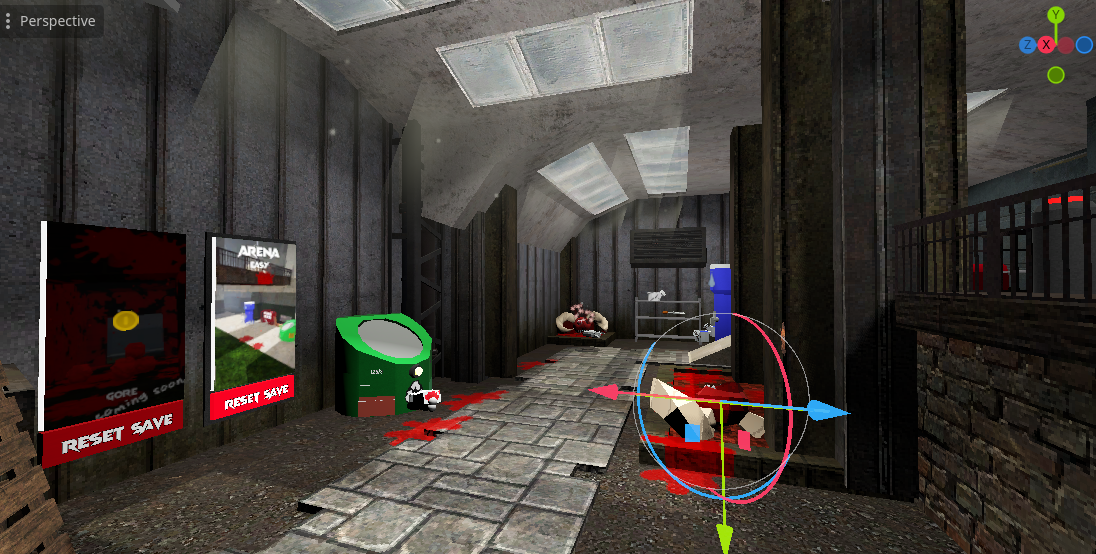
With my world so far I guess it has sort of a low-poly dream-core aesthetic, but without a pixel filter (nor textures mostly). Tile floors, purple sky and glowing moon, random stuff everywhere, and it’s all on a floating island.

Not much, but I explored custom fonts a bit.
Not sure if you’ll see the image, seems the host is having some issue now. Didn’t notice right away as it was cached for me.
I wish color font were easier (via FontForge, or instead using 1-command to bundle SVGs into an OTF file).
Then again, I also prefer textmesh which does not support color font either (even though the vertex color shader itself does, maybe someone better can/has figured out some sort of per-glyph color map).
The image isn’t loading 🤔
I do any special text formatting with bbcode, it’s very flexible though it can look ugly (custom bbcode tags can help with that)
It’s more obvious with the image (which should be loading now) but I’m talking about custom icons. Like having a fire icon be red/yellow while the rest of the text has its own color.
The richtextlabel does font+sizing etc differently*, I don’t like seeing pixels (can be dialed in, but not my favorite to require) though at least for the standard label the new stacked effects are a bit snazzy (and theme-like) so I guess I don’t hate it now that I do have it dialed in.
* which does not surprise me given the other text methods all have benefits and drawbacks (and even with the 2D label, color emoji can kinda look off with outlines but that might be down to the font?)
I see now, those stacked effects are pretty cool! You might be able to top-left-align a child RichTextLabel with just the icon if you wanted to use an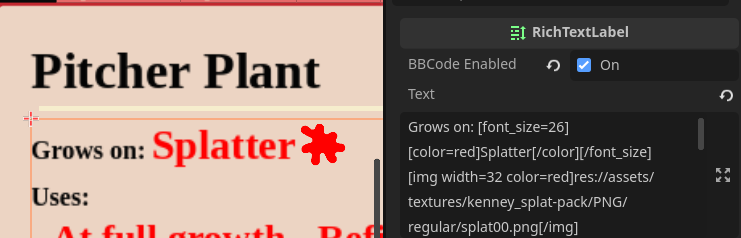
imgtag, the coloring works pretty well:What’s your game about? 👀
I guess just the color tag on the character is enough, though will likely need to manually enter the color-code each time (I have my own palette, even worse if I even need to change* it). Also neat that the outline can be change this way too (not shadow?), though seems a bit messy to stack these in BBCode.
I’m guessing custom effects might be the thing that would allow me to make my own color map. Not sure if that would always apply or if I’d have to wrap any icon in custom BBCode for that to apply, and either way still not textmesh (or label3d).
Also for my complaint on the node itself, I guess it’s the same as a normal label with font scaling, just throws me off with the small default font size looking blurry in the editor (and existing fonts probably make more sense for smaller text, or even 2D text in general)
* shader globals don’t seem to work here (unless I’m missing something), though also my palette is ordered (7x5) so a vertical list isn’t great anyway. OTOH I did use 3-digit hex codes, so it’s not difficult to type in (remembering/interpreting, not so much)
No game yet (and maybe never), currently have mainly messed around with models+vertex colors (Blender, not good with that either), not quite happy with the gridmap node.
With my world so far I guess it has sort of a low-poly dream-core aesthetic, but without a pixel filter (nor textures mostly). Tile floors, purple sky and glowing moon, random stuff everywhere, and it’s all on a floating island.
You could use the custom tag! You can do some crazy things with it, but a set color for a keyword wouldn’t be too bad: https://docs.godotengine.org/en/stable/tutorials/ui/bbcode_in_richtextlabel.html#custom-bbcode-tags-and-text-effects
Interesting game, nothing wrong with some style exploration! Modeling stuff is still a bit magic to me